

| ⚠️ Disclaimer: This is for educational purposes only. Always consult legal and tax professionals before launching a token. Do not create tokens that could be deemed securities, infringe trademarks, or use copyrighted names without permission. |
What is a token (jetton) on TON?
On TON (The Open Network), custom tokens are known as jettons. They follow a standard smart‑contract template that lets you issue, transfer, mint, burn, and manage metadata (name, symbol, logo) in a transparent and decentralized way.
Instead of building everything from scratch, TON provides tools and platforms that streamline the process. You can code it yourself, or get started without coding skills.
Why you must be cautious before launching
Creating a token might seem fun or powerful, but there are serious legal, ethical, and technical pitfalls. Here are a few you must keep in mind:
- Tax & regulation risk: In many jurisdictions, tokens can be considered taxable assets or securities. Issuing a token that looks like an “investment” or promises returns could draw regulatory scrutiny.
- Intellectual property risks: Don’t name your token using brand names you don’t own (e.g. “NikeCoin,” “GoogleToken”) or use copyrighted logos. You could face trademark or copyright claims.
- Trust & security: If you retain administrative rights (minting, burning, metadata control), you risk being seen as centralized or manipulable. Many token creators revoke admin rights after deployment to instill trust.
- Misleading marketing: Avoid making promises about profit, guaranteed value increases, or income. Focus on utility, access, or use-cases instead.
How to create your token: step-by-step
Below is a general workflow using Minter TON (minter.ton.org) — TON’s official token issuance tool.
1. Prepare your wallet & funds
- Make sure you have a TON-compatible wallet (e.g. Tonkeeper, Tonhub, MyTonWallet, Wallet in Telegram).
- Ensure you have enough Toncoin to cover deployment fees (gas / deployment cost). The tool may require something like ~0.5-10 TON (or whatever the current deployment cost is).
- If needed, purchase TON and transfer to your wallet.
2. Go to the token minting platform
- Navigate to minter.ton.org. (This is the official tool for creating jettons on TON.)
- You’ll see a form to input token details: name, symbol (ticker), decimals, total supply, optional description or comment, and logo.
- Screenshot placeholder: Show token creation form on minter.ton.org.
3. Fill in token details
Here’s what each field means:
| Field | What to enter | Tips / Cautions |
| Token name | Full human-readable name (e.g. “MyToken”) | Avoid copyrighted names |
| Symbol / ticker | Short uppercase letters (e.g. “MTK”) | Must be unique and not infringing |
| Decimals | Number of decimal places (e.g. 9) | Decide how granular transfers should be |
| Total supply | How many tokens to issue at launch | This is your initial minted amount |
| Logo / image | Upload an icon (PNG, JPG, etc.) | Keep file size small, use original design |
| Optional description or comment | Extra notes about token use | Avoid promises or claims of financial returns |
Double-check all values — once deployed, some parts cannot be changed.
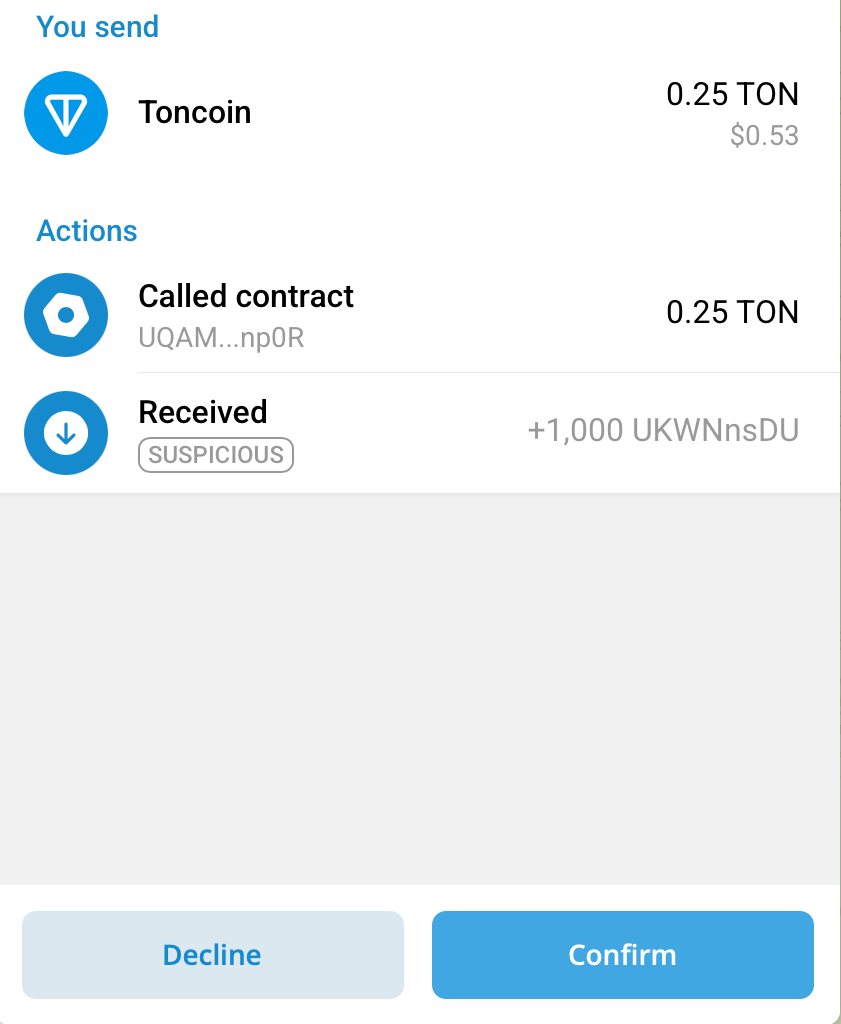
4. Connect wallet & deploy
- Click “Connect Wallet” (or similar). This triggers your wallet to link to the minting page.
- Confirm required permissions and gas fee in your wallet.
- Click “Deploy” or “Create Token.” The smart contract is published on the TON blockchain.
- Wait for confirmation. It usually takes seconds to a minute.
5. Verify on blockchain explorer
- Use TON explorers like Tonviewer or similar to check your token contract address.
- The token should now appear under the “Jettons” tab or by searching the contract.
6. (Optional but recommended) Revoke administrative rights
To increase trust and signal that no one can arbitrarily change token settings, many creators revoke admin/ownership rights.
On TON, this usually means explicitly removing the admin address from the Jetton smart contract (setting it to null or a burn address). Once this action is confirmed on-chain, no one can mint new tokens, update metadata, or change core parameters anymore.
In practice, revoking admin rights can be done either:
- via a supported interface or deployment tool that provides a “Revoke admin / ownership” action, or
- by sending a one-time transaction that transfers ownership to an empty (non-controlled) address.
After revocation, the token becomes effectively immutable, which is often seen as a strong trust signal by users.
If you plan to retain admin rights, clearly document your governance and control rules (for example, mint limits, upgrade policies, or multisig usage) so users understand exactly what level of control you keep and why.
7. Add token to wallets & share
- Some wallets don’t auto-detect new tokens. Use “Add custom token” or paste the contract address to display.
- Share your token’s contract address for people to explore or receive your token.
- Optionally, list it on token indexing sites / platforms in the TON ecosystem.
Note on taxable tokens
Some tokens implement so-called tax or fee-on-transfer mechanics, where a portion of each transfer is automatically redirected (for example, to a treasury, burn address, or rewards pool). While this design can serve specific use cases, such tokens often deviate from the standard token behavior.
As a result, they may not be fully compatible with all wallets, DEXs, or DeFi applications, and in some cases are explicitly unsupported or restricted. If you plan to create or interact with taxable tokens, proceed with caution, carefully review integration limitations, and clearly communicate these mechanics to users.
Alternatives & more advanced options
Disclaimer: The following tools and services are mentioned for informational purposes only. We do not promote, endorse, or recommend any specific third-party platforms. Always do your own research (DYOR), review the smart contracts, and understand the risks before using any external service.
- DYOR Minter: Allows creation, minting, burning, metadata edits, and revoking rights. dyor.io
- CoinFactory / Jetton Generator: No-code tools to generate tokens easily. CoinFactory
- Jetton Launcher via Tonhub / Whales Club: Deploy tokens via integrated tools (may have access restrictions). Tonhub
Best practices & security tips
- Respect intellectual property and copyright rules (!)
- Always test with small amounts first.
- Use audited code or standard token templates.
- Revoke admin rights if possible.
- Do not promise financial returns or guarantees.
- Be transparent with users about control and token rules.
- Monitor activity post-launch and be ready to respond to issues.
Final thoughts
Creating a token (jetton) on TON is now accessible to many users thanks to minting tools like minter.ton.org and no-code generators. But ease of creation also brings responsibility: avoid legal pitfalls, maintain trust, and act transparently.
When done right, your token can serve meaningful use-cases (loyalty systems, community points, rewards, in‑app currency) rather than being a speculative instrument.
Once your token is deployed, you can start actually using it. For example, you can create a liquidity pool in swap applications like STON.fi, making your token available for public trading. From there, your token can be swapped, added to liquidity pools, and integrated into the broader TON DeFi ecosystem — turning it from “just a contract” into a live, tradable asset.